

Introduction
MKVToolNix is a powerful and widely used open-source software suite designed for working with Matroska (MKV) video files. It provides tools that allow users to create, split, merge, edit, and inspect MKV files with high efficiency. The software is popular among video enthusiasts, editors, and developers who frequently work with MKV containers and need a reliable solution for managing video tracks, audio streams, and subtitles.
- Introduction
- Overview of MKVToolNix
- Key Features
- 1. MKV File Muxing
- 2. Track Editing and Management
- 3. Subtitle Support
- 4. Splitting and Merging Videos
- 5. Chapter Editing
- 6. Metadata Editing
- 7. Cross-Platform Compatibility
- User Interface and Ease of Use
- Performance and Speed
- Pros
- Cons
- Who Should Use MKVToolNix?
- Security and Reliability
- Final Verdict
- Personal Recommendation
The official website, MKVToolNix Official Website, offers downloads for multiple operating systems including Windows, macOS, and Linux. Because the software is open source and actively maintained, it continues to receive updates that improve functionality, compatibility, and performance.
Overview of MKVToolNix
MKVToolNix is essentially a toolkit for the Matroska multimedia container format. It allows users to manipulate MKV files without re-encoding video or audio streams, which means the process is fast and does not reduce quality.
The software includes several tools, with the most commonly used being MKVToolNix GUI, which provides a graphical interface for tasks like muxing (combining) tracks, adding subtitles, and editing metadata.
Users can combine video, audio, and subtitle files into a single MKV container. They can also remove unnecessary tracks, split large videos into smaller segments, or extract specific streams from an MKV file.
Key Features
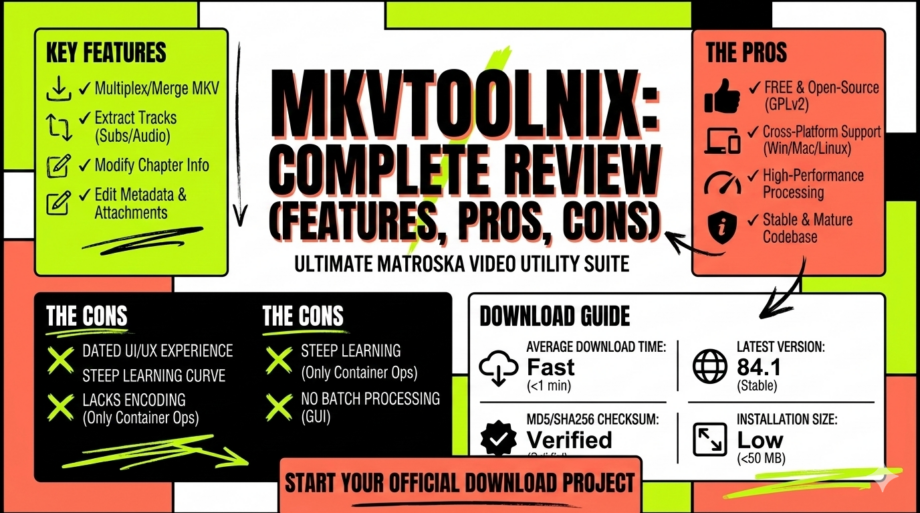
1. MKV File Muxing
One of the main functions of MKVToolNix is muxing, which means combining multiple media streams into one MKV container. Users can add video files, audio tracks, subtitle files, and chapters easily.
2. Track Editing and Management
The software allows users to enable or disable tracks, change language tags, and modify track properties such as delay and default track status.
3. Subtitle Support
MKVToolNix supports a wide range of subtitle formats including SRT, ASS, and SSA. Users can add subtitles to a video file or remove unwanted subtitle tracks.
4. Splitting and Merging Videos
Users can split large MKV files based on size, duration, or timestamps. This feature is especially useful for archiving, sharing, or managing large video files.
5. Chapter Editing
MKVToolNix allows users to add or edit chapters within a video file, making navigation easier for long movies or series episodes.
6. Metadata Editing
The tool enables users to modify metadata such as title, language, and other track information.
7. Cross-Platform Compatibility
MKVToolNix works on multiple operating systems including:
-
Windows
-
macOS
-
Linux
This makes it accessible for a wide range of users.
User Interface and Ease of Use
The MKVToolNix GUI provides a modern interface that simplifies tasks that were previously done through command lines. Users can drag and drop files into the interface and quickly configure settings before starting the muxing process.
Although beginners might initially find some options confusing, the interface becomes easier to understand with practice.
Performance and Speed
One of the biggest advantages of MKVToolNix is that it does not re-encode media files. Instead, it simply reorganizes tracks within the MKV container. This makes the process extremely fast compared to traditional video editing software.
Large files can be processed in minutes depending on system performance.
Pros
-
Completely free and open source
-
Supports multiple operating systems
-
Fast processing without re-encoding
-
Powerful track management tools
-
Supports multiple subtitle formats
-
Regular updates and improvements
-
Ideal for MKV container editing
Cons
-
Not designed for full video editing like trimming or effects
-
Beginners may need time to understand all options
-
Mainly focused on MKV format rather than other video containers
-
Advanced settings may appear complex to casual users
Who Should Use MKVToolNix?
MKVToolNix is ideal for:
-
Video editors working with MKV files
-
Movie collectors who manage subtitle tracks
-
Content creators who need to combine media files
-
Developers and advanced users dealing with multimedia containers
It is less suitable for users who want traditional video editing features such as cutting scenes, applying filters, or color grading.
Security and Reliability
Since MKVToolNix is open source and maintained by an active community, it is considered safe and reliable. The software has been used for many years and has built a strong reputation among video enthusiasts and professionals.
Downloading it from the official website ensures users receive the latest and safest version.
Final Verdict
MKVToolNix is one of the best tools available for managing MKV video files. Its powerful muxing capabilities, fast performance, and cross-platform support make it a top choice for anyone who frequently works with Matroska containers.
While it may not replace full video editing software, it excels at what it is designed for—efficiently handling MKV media files.
Personal Recommendation
If you regularly work with MKV videos, adding subtitles, merging audio tracks, or organizing media streams, MKVToolNix is an excellent tool to have. It is reliable, free, and powerful enough to handle complex MKV editing tasks.
For users who need a professional-level MKV management tool without paying for expensive software, MKVToolNix is highly recommended.